Technical Issues and Questions
-
swo17

- Bloodthirsty Butcher
- Joined: Tue Apr 15, 2008 2:25 pm
- Location: SLC, UT
Re: Technical Issues and Questions
I once tried to watch a film where the only available subtitles were all in black. The half that were visible to the human eye didn't look that bad though, actually.
-
domino harvey

- Dot Com Dom
- Joined: Wed Jan 11, 2006 6:42 pm
Re: Technical Issues and Questions
I still sort of hate Vampyr due to post-traumatic stress brought about by those huge black Image sub(stantial)titles, so it could always be worse...
-
PillowRock
- Joined: Wed Feb 06, 2008 12:54 am
Re: Subtitle Resolution
That's assuming that there are black outlines.vogler wrote:Snow or other white areas don't matter at all. That's what the black outlines are for.
I still remember watching TV showings of Tora! Tora! Tora! where half of the white, non-outlined subtitles in the Japanese sections were effectively invisible against the Japanese officers' dress white uniforms.
I don't like garish subtitle colors that clash with the film's color scheme ...... but they're less bad than invisible non-outlined ones.
-
vogler

- Joined: Thu Jun 29, 2006 12:42 pm
- Location: England
Re: Subtitle Resolution
Indeed. White subtitles without black outlines are an absolute disaster. For anyone who thinks the subtitles on Facets DVDs are bad (which of course they are), you should see the ones they used to have on their VHS tapes. Totally unreadable for vast sections of films. I was so glad when Criterion released the Makavejev films so I could finally understand what the hell everyone was saying.PillowRock wrote:That's assuming that there are black outlines.
Lately I've also noticed a few Artificial Eye DVDs with no outlines on the subs, with some lines disappearing entirely into the background. This is very unusual for them which makes me think it was an authoring mistake.
Worst of all, though, are the Casa Negra/Panic House white subtitles with bright neon blue outlines. What the hell were they thinking? Matt posted a screen cap of these in the Casa Negra thread. Get a load of this heinous example of subtitling!
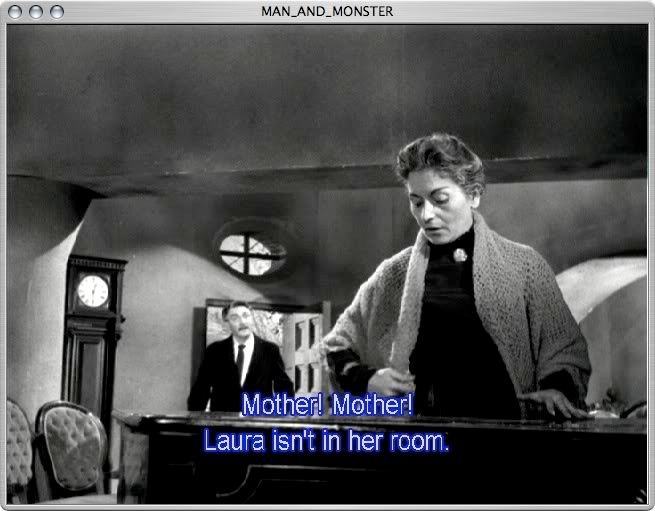
And they look even worse than that when you view them on a large monitor with the film in motion. With this DVD I just turn the colour off on my monitor since the film is black & white, but with some of the Panic House Teruo Ishii releases I actually had to re-author the DVDs with black subtitle outlines before I could watch them. The blue was just unbearably distracting. Thankfully they only used the blue subs on a few of their DVDs.
-
perkizitore

- Joined: Thu Jul 10, 2008 7:29 pm
- Location: OOP is the only answer
Re: Technical Issues and Questions
The neon blue subs appear on Koch Lorber's 'Chan is missing' disc as well, but only for Chinese #-o
-
TMDaines

- Joined: Wed Nov 11, 2009 5:01 pm
- Location: Greater Manchester
Re: Technical Issues and Questions
The best subtitles I've seen are on RHV's release of Ossessione (fantastic disk by the way). Standard white with black border but semi-transparent and a good choice of font.


-
MyNameCriterionForum

- Joined: Sat Jun 21, 2008 9:27 am
Re: Technical Issues and Questions
Those may appear different in motion, but the value changes within the words and individual letters are incredibly distracting, in my opinion.
-
Tommaso

- Joined: Fri May 19, 2006 2:09 pm
Re: Technical Issues and Questions
Absolutely, and not just on projection systems, but also on any decent-size TV. That's my only grudge against many an MoC disc; I found the subs on the Mizoguchi discs far too large, really. Criterion in many cases, especially 1.33 films, seems to uses smaller fonts. I also think, but am not fully sure, that the CC subs are often 'less white', and thus less intrusive.Gregory wrote: On the projection systems I've used for the last ten years, the subtitles are usually way too large for my tastes -- too easy to read.
-
vogler
- Joined: Thu Jun 29, 2006 12:42 pm
- Location: England
Re: Technical Issues and Questions
This is another important point. Sometimes light grey subtitles are better than pure white. In darker scenes, if the subtitles are very bright white, they can tend to stand out too much and prevent your eyes from properly adjusting to the darkness of the image.Tommaso wrote:I also think, but am not fully sure, that the CC subs are often 'less white', and thus less intrusive.
-
colinr0380

- Joined: Mon Nov 08, 2004 8:30 pm
- Location: Chapel-en-le-Frith, Derbyshire, UK
Re: Technical Issues and Questions
I remember the very first wave of DVDs from Tartan still used the old burnt in cinema subtitles, as they had for their VHS tapes. Mostly these subtitles were servicable but there was always the occasion when they blended into the background, as in these captures from an early sequence of Ring:

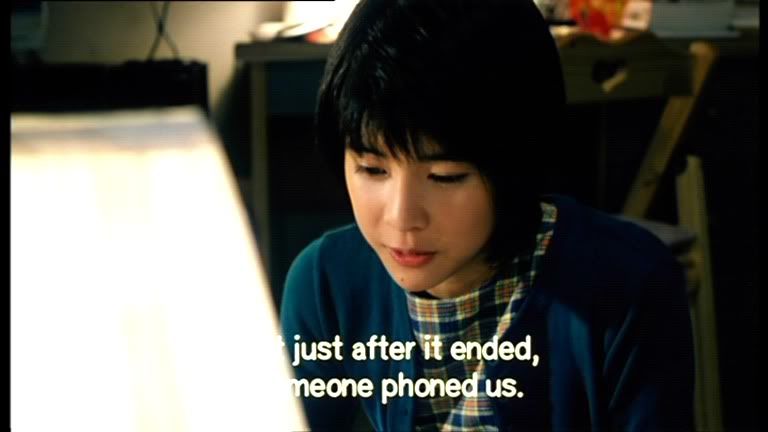
The worst part was that it got me so on edge, waiting and hoping that nothing white would intrude into the subtitle section of the frame! Though I suppose it adds a whole extra edge of your seat tension to a horror film! Of course most of discs like this (Funny Games was another particularly bad example, worse perhaps because of the bright white clothes of the boys and more scenes set in daytime) were eventually reissued with digital, removable subtitles with the thin black border defining the edges of the letters.
The worst part was that it got me so on edge, waiting and hoping that nothing white would intrude into the subtitle section of the frame! Though I suppose it adds a whole extra edge of your seat tension to a horror film! Of course most of discs like this (Funny Games was another particularly bad example, worse perhaps because of the bright white clothes of the boys and more scenes set in daytime) were eventually reissued with digital, removable subtitles with the thin black border defining the edges of the letters.
-
domino harvey
- Dot Com Dom
- Joined: Wed Jan 11, 2006 6:42 pm
Re: Blu-ray, in General
Okay, first day on the job and already I have a stupid question: Can a Blu-ray from another region that's 1080i and not p still play okay on an American TV? Does this difference effect the image quality?
-
The Fanciful Norwegian

- Joined: Tue Nov 02, 2004 6:24 pm
- Location: Teegeeack
Re: Blu-ray, in General
If it's 1080i50, then probably not, although that depends on your player and/or set -- some U.S. models support it, but most don't. 1080i60 should work on everything. If the source is truly interlaced there'll be a quality hit, but if it's a progressive source (i.e. 1080p25 or 1080p30, which aren't supported by Blu-ray and get converted to 50i/60i), your player or set should be able to perform 2:2 pulldown and produce a truly progressive image. This is why, for example, the European Antichrist BD shows no interlacing artifacts even though it's a 50i encode. That said, some models are better at this operation than others.
Where did you hear this? They may not have recovered the costs of the switchover yet, but I find it hard to believe they're still taking a continuing loss on every title they produce.swo17 wrote:As I understand it, they are actually selling BDs at a loss as it is.
-
manicsounds

- Joined: Wed Nov 03, 2004 2:58 am
- Location: Tokyo, Japan
Re: Blu-ray, in General
I've had no problems for any BDs on the Momitsu so far. And I have Region A, Region B, 1080p, 1080i60, 1080i50, NTSC, PAL, and everything plays smoothly.domino harvey wrote:Okay, first day on the job and already I have a stupid question: Can a Blu-ray from another region that's 1080i and not p still play okay on an American TV? Does this difference effect the image quality?
(UNFORTUNATELY, I took it out to work today for a day, and when I brought it home, forgot the remote at work! And with the Momitsu, you're shit out of luck playing anything without the remote....)
-
Anthony

- Joined: Mon Feb 14, 2005 5:38 pm
- Location: Berkeley, CA
Re: Blu-ray, in General
Unfortunately you are wrong. I own the BD-83 from Oppo and it is Region locked to A for Blu and region locked to 1 for DVD. You have to buy the aftermarket hardware hack to unlock the region coding for both Blu and DVD. Once you do so, it will play anything you put in it.triodelover wrote:Depends on the player, unfortunately. Someone correct me if I'm wrong, but I believe the Oppo BD-83 will come region locked for Blu (without the aftermarket hack) but will be region free for Sd.
-
triodelover

- Joined: Sat Jan 27, 2007 6:11 pm
- Location: The hills of East Tennessee
Re: Blu-ray, in General
My apologies. I could have sworn I read a review somewhere that stated the Oppo was region-free for SD. Sorry if I confused the issue.Anthony wrote:Unfortunately you are wrong. I own the BD-83 from Oppo and it is Region locked to A for Blu and region locked to 1 for DVD. You have to buy the aftermarket hardware hack to unlock the region coding for both Blu and DVD. Once you do so, it will play anything you put in it.triodelover wrote:Depends on the player, unfortunately. Someone correct me if I'm wrong, but I believe the Oppo BD-83 will come region locked for Blu (without the aftermarket hack) but will be region free for Sd.
-
perkizitore
- Joined: Thu Jul 10, 2008 7:29 pm
- Location: OOP is the only answer
Re: Blu-ray, in General
I use only modded firmware and now it's region free for SD and i just need to change between regions A and B for blu.Anthony wrote:Unfortunately you are wrong. I own the BD-83 from Oppo and it is Region locked to A for Blu and region locked to 1 for DVD. You have to buy the aftermarket hardware hack to unlock the region coding for both Blu and DVD. Once you do so, it will play anything you put in it.triodelover wrote:Depends on the player, unfortunately. Someone correct me if I'm wrong, but I believe the Oppo BD-83 will come region locked for Blu (without the aftermarket hack) but will be region free for Sd.
-
markhax

- Joined: Sat Oct 20, 2007 9:42 pm
Re: Blu-ray, in General
What is "modded" firmware?perkizitore wrote: I use only modded firmware and now it's region free for SD and i just need to change between regions A and B for blu.
-
Zot!
- Joined: Wed Jan 20, 2010 4:09 am
Re: Blu-ray, in General
A hardware hack rather than a software hack.
-
perkizitore
- Joined: Thu Jul 10, 2008 7:29 pm
- Location: OOP is the only answer
Re: Technical Issues and Questions
Sorry, i should have said firmware mod 
-
Saturnome

- Joined: Sun Aug 12, 2007 9:22 pm
Re: Technical Issues and Questions
I thought a computer could play any region. But I just tried a R2 DVD and the computer is saying I must change the region and that I can only do this 4 more times. Is there anyway to avoid it? Is it the program I'm using?
-
triodelover
- Joined: Sat Jan 27, 2007 6:11 pm
- Location: The hills of East Tennessee
Re: Technical Issues and Questions
It's either the counter in the firmware of the drive or in the specific media player/operating system. VLC Media Player will override the drive problem and play any region without requiring a change. It isn't BD friendly and will only play BD rips in the form of something like a *.mkv file, and that's not likely to be at full resolution. VLC is a cross-platform application. If you need BD region-free capability, that means Windows, an appropriate drive and media player (e.g. ArcSoft's TotalMedia Theater 3 Platinum, Cyberlink's PowerDVD 9 Ultra) plus AnyDVDHD from Slysoft. AnyDVDHD will make you region-free for both SD and BD and also bypass any encryption and HDCP compatibility problems. I've done all this on a Mac if you need more detail.Saturnome wrote:I thought a computer could play any region. But I just tried a R2 DVD and the computer is saying I must change the region and that I can only do this 4 more times. Is there anyway to avoid it? Is it the program I'm using?
-
Saturnome
- Joined: Sun Aug 12, 2007 9:22 pm
Re: Technical Issues and Questions
AnyDVDHD works! Thanks. It's a time-limited demo it seems, but it will do for the time before I get a region-free player. Thanks again.
-
triodelover
- Joined: Sat Jan 27, 2007 6:11 pm
- Location: The hills of East Tennessee
Re: Technical Issues and Questions
I think you will find that AnyDVDHD will make you forget about a region-free player, particularly when and if you go Blu. I have a Plextor external BD drive, AnyDVDHD and ArcSoft's media player, and I haven't experienced any of the problems that have been reported for either specific discs or specific stand-alone players. And since I was already using a HTPC set-up, it saves space over a stand-alone.Saturnome wrote:AnyDVDHD works! Thanks. It's a time-limited demo it seems, but it will do for the time before I get a region-free player. Thanks again.
-
manicsounds
- Joined: Wed Nov 03, 2004 2:58 am
- Location: Tokyo, Japan
Re: Technical Issues and Questions
I got the "Sherlock Holmes" Warner Bros BD, and tried to watch the "Maximum Movie Mode". Can't get it to function. Just a black screen, and nothing happens. The only way to get back to the menu screen is to stop the disc and restart it.
This is the first time to try to watch a disc with "Maximum Movie Mode", and I've been able to watch Picture-In-Picture on other releases, but why not this one?
I have a Momitsu clone 1.1 machine. Anyone else?
This is the first time to try to watch a disc with "Maximum Movie Mode", and I've been able to watch Picture-In-Picture on other releases, but why not this one?
I have a Momitsu clone 1.1 machine. Anyone else?
-
TMDaines
- Joined: Wed Nov 11, 2009 5:01 pm
- Location: Greater Manchester
Re: Technical Issues and Questions
Yeh, getting all the bells and whistles the major labels use on their Blu-rays is likely to have issues on the Momitsus as they aren't kept up-to-date. You should ask on the AVforums.com or one of the Bluray forums as it is likely there are others with the same problem.